

We recommend that you familiarize yourselves with UI Customization Concepts before attempting to modify any components.
Overview
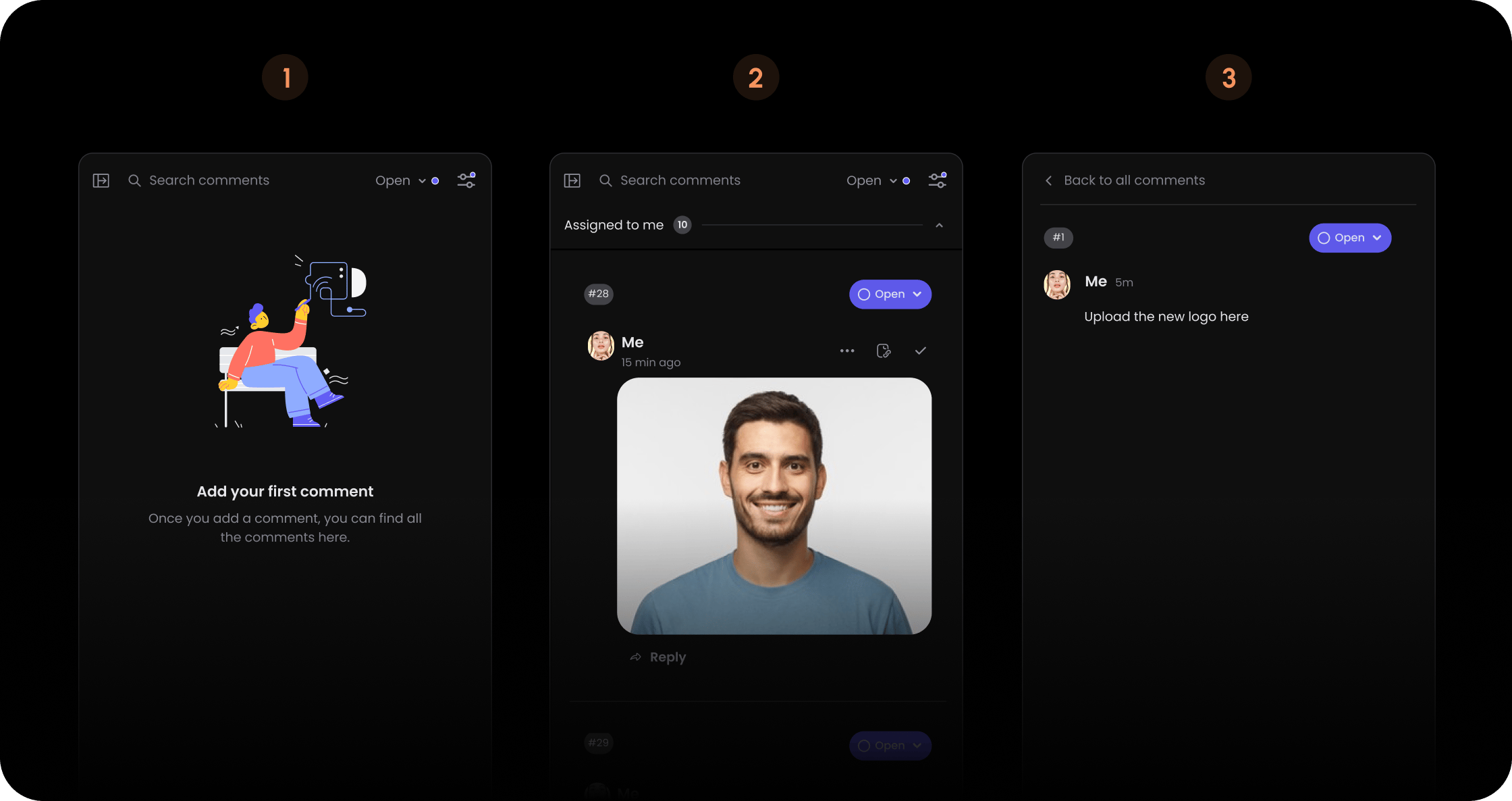
- React / Next.js
- Other Frameworks
Skeleton
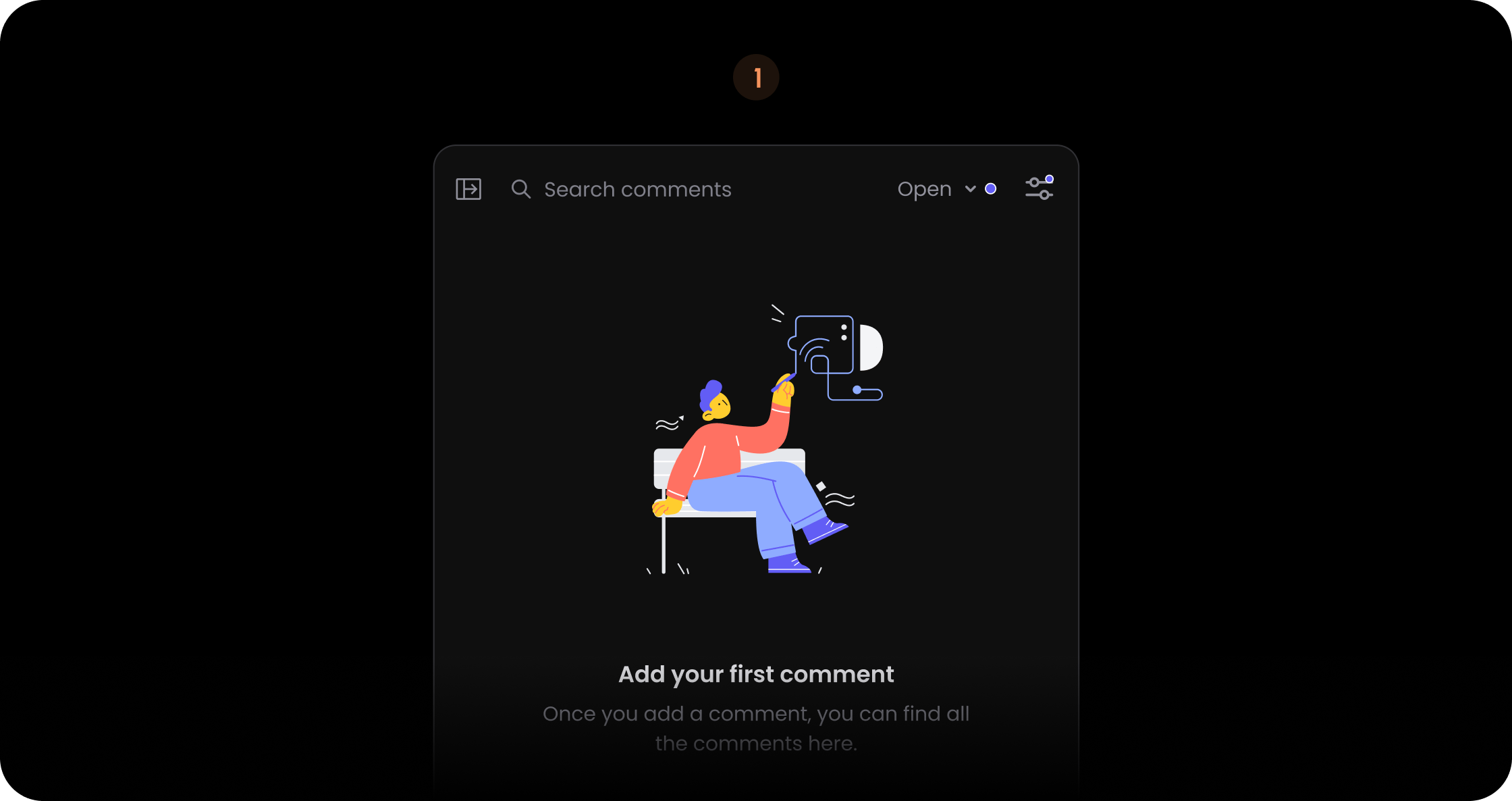
- React / Next.js
- Other Frameworks
Panel
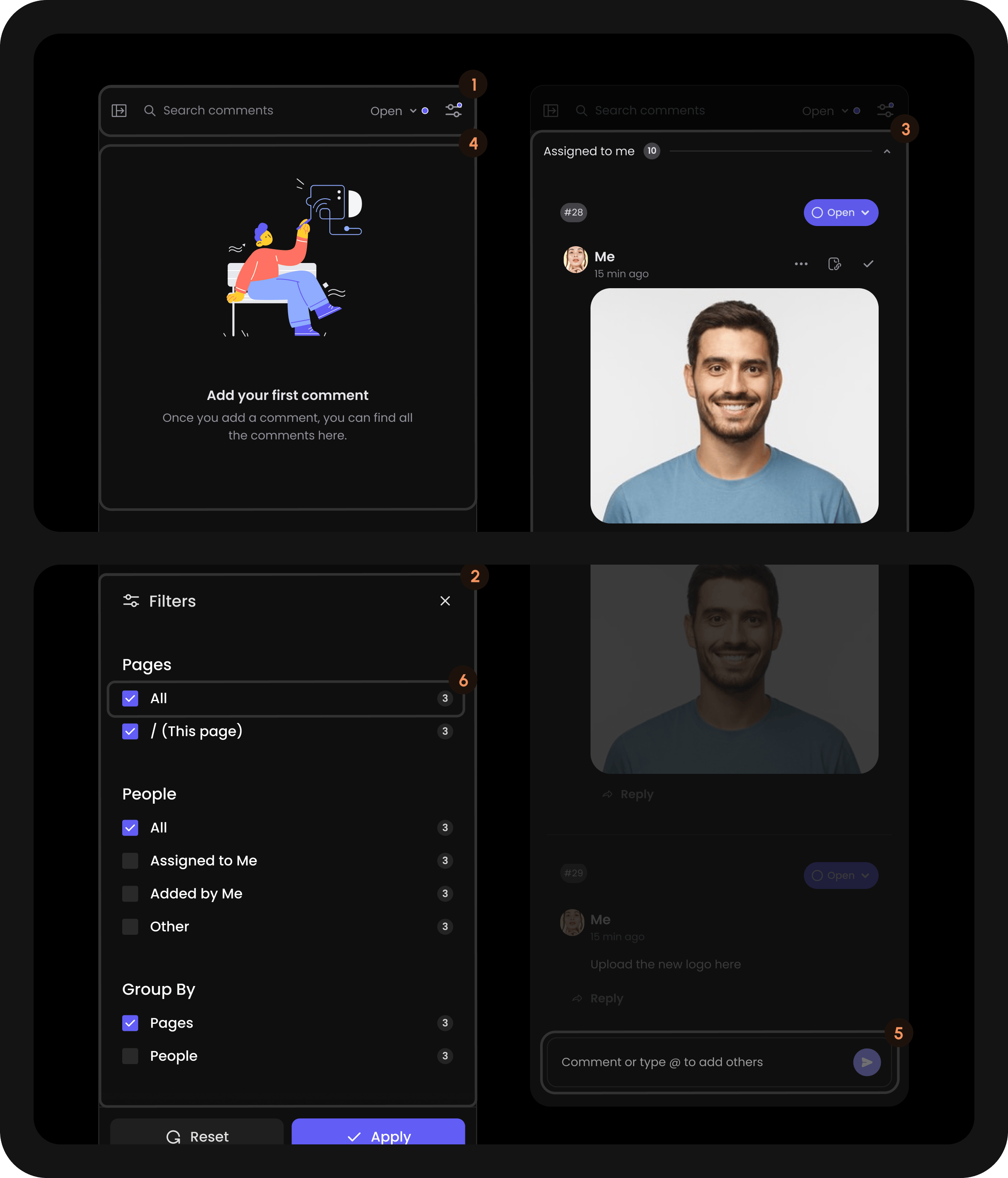
- React / Next.js
- Other Frameworks
Header (Panel)
.png?fit=max&auto=format&n=nOE4yd5dUNjWOH3A&q=85&s=f13bd10d4e2814ff31d16555df623df1)
- React / Next.js
- Other Frameworks
FullscreenButton (Panel Header)
Button to toggle full-screen mode for the Comments Sidebar. This component only appears when full-screen mode is enabled via thefullScreen prop or API method. Clicking it allows users to expand the sidebar to fill the entire viewport or return to normal mode.
- React / Next.js
- Other Frameworks
CloseButton (Panel Header)
.png?fit=max&auto=format&n=M3HkOFrkFmgstAmP&q=85&s=ec66541005a29073d8badf8103823ed8)
- React / Next.js
- Other Frameworks
Search (Panel Header)
.png?fit=max&auto=format&n=vHdpvC1890cm-3bX&q=85&s=422b71c5c9b76659a8c637043421cfaa)
- React / Next.js
- Other Frameworks
ResetFilterButton (Panel Header)
.png?fit=max&auto=format&n=vHdpvC1890cm-3bX&q=85&s=9279063c33ac95cee1473b545a939f06)
- React / Next.js
- Other Frameworks
Status (Panel Header)
.png?fit=max&auto=format&n=vHdpvC1890cm-3bX&q=85&s=b5d133bf5b36e3e71362c7101417c6d6)
- React / Next.js
- Other Frameworks
Trigger (Panel Header Status)
.png?fit=max&auto=format&n=vHdpvC1890cm-3bX&q=85&s=87e014b85ed979206bd50767fe55e1d6)
- React / Next.js
- Other Frameworks
Name (Panel Header Status Trigger)
.png?fit=max&auto=format&n=vHdpvC1890cm-3bX&q=85&s=8cefa4816477b99f6bf30431e81f389a)
- React / Next.js
- Other Frameworks
Arrow (Panel Header Status Trigger)
.png?fit=max&auto=format&n=M3HkOFrkFmgstAmP&q=85&s=bfba9587ab4ecdebd4597858ca42b161)
- React / Next.js
- Other Frameworks
Indicator (Panel Header Status Trigger)
.png?fit=max&auto=format&n=nOE4yd5dUNjWOH3A&q=85&s=6b1725ea6e0ae328f02540725ea04da4)
- React / Next.js
- Other Frameworks
Content (Panel Header Status)
.png?fit=max&auto=format&n=M3HkOFrkFmgstAmP&q=85&s=a137b3a9d84d910e236bf251fb69d9d3)
- React / Next.js
- Other Frameworks
Item (Panel Header Status Content)
.png?fit=max&auto=format&n=nOE4yd5dUNjWOH3A&q=85&s=5c2ed9bcc4f0813d40c09ebc631759b0)
- React / Next.js
- Other Frameworks
Icon (Panel Header Status Content Item)
.png?fit=max&auto=format&n=nOE4yd5dUNjWOH3A&q=85&s=e01ea918e53b04a6f6ec2f2248217eee)
- React / Next.js
- Other Frameworks
Name (Panel Header Status Content Item)
.png?fit=max&auto=format&n=vHdpvC1890cm-3bX&q=85&s=374298a191d58d5cc394a04a88923b1e)
- React / Next.js
- Other Frameworks
Count (Panel Header Status Content Item)
.png?fit=max&auto=format&n=M3HkOFrkFmgstAmP&q=85&s=ee65e43878963c096a7214dd8e090e89)
- React / Next.js
- Other Frameworks
Checkbox (Panel Header Status Content Item)
.png?fit=max&auto=format&n=M3HkOFrkFmgstAmP&q=85&s=4b121f376f04d88baf345305997a8429)
- React / Next.js
- Other Frameworks
Checked (Panel Header Status Content Item Checkbox)
- React / Next.js
- Other Frameworks
Unchecked (Panel Header Status Content Item Checkbox)
- React / Next.js
- Other Frameworks
LocationFilterDropdown (Panel Header)
.png?fit=max&auto=format&n=nOE4yd5dUNjWOH3A&q=85&s=d74814eb791964e882a5dc720c2dba2a)
- React / Next.js
- Other Frameworks
Trigger (Panel Header LocationFilterDropdown)
.png?fit=max&auto=format&n=vHdpvC1890cm-3bX&q=85&s=74bc0877ca59c06a6808e6ec997644e9)
- React / Next.js
- Other Frameworks
Label (Panel Header LocationFilterDropdown Trigger)
- React / Next.js
- Other Frameworks
Content (Panel Header LocationFilterDropdown)
.png?fit=max&auto=format&n=M3HkOFrkFmgstAmP&q=85&s=1e482c1799e2b4f0865e1c1a6df3399f)
- React / Next.js
- Other Frameworks
MinimalFilterDropdown (Panel Header)
.png?fit=max&auto=format&n=nOE4yd5dUNjWOH3A&q=85&s=116d47a77cda299f12f5c3f03db88ea7)
- React / Next.js
- Other Frameworks
Trigger (Panel Header MinimalFilterDropdown)
.png?fit=max&auto=format&n=vHdpvC1890cm-3bX&q=85&s=191d74441937d5f55c4b48630134c219)
- React / Next.js
- Other Frameworks
Content (Panel Header MinimalFilterDropdown)
.png?fit=max&auto=format&n=M3HkOFrkFmgstAmP&q=85&s=012d86d3d267bca066977a412e47f072)
- React / Next.js
- Other Frameworks
SortDate (Panel Header MinimalFilterDropdown Content)
.png?fit=max&auto=format&n=vHdpvC1890cm-3bX&q=85&s=85da6f120919cc644502a4950755ff09)
- React / Next.js
- Other Frameworks
SelectedIcon (Panel Header MinimalFilterDropdown Content SortDate)
- React / Next.js
- Other Frameworks
SortUnread (Panel Header MinimalFilterDropdown Content)
.png?fit=max&auto=format&n=vHdpvC1890cm-3bX&q=85&s=7aa1c5bd1fe1015bbd7325f3a7ac5fdb)
- React / Next.js
- Other Frameworks
SelectedIcon (Panel Header MinimalFilterDropdown Content SortUnread)
- React / Next.js
- Other Frameworks
FilterAll (Panel Header MinimalFilterDropdown Content)
.png?fit=max&auto=format&n=nOE4yd5dUNjWOH3A&q=85&s=1a81f571134b7f501240fa94bae8301e)
- React / Next.js
- Other Frameworks
SelectedIcon (Panel Header MinimalFilterDropdown Content FilterAll)
- React / Next.js
- Other Frameworks
FilterUnread (Panel Header MinimalFilterDropdown Content)
.png?fit=max&auto=format&n=nOE4yd5dUNjWOH3A&q=85&s=b9269f301b4920b7aabbfb2697dc5c94)
- React / Next.js
- Other Frameworks
SelectedIcon (Panel Header MinimalFilterDropdown Content FilterUnread)
- React / Next.js
- Other Frameworks
FilterRead (Panel Header MinimalFilterDropdown Content)
.png?fit=max&auto=format&n=nOE4yd5dUNjWOH3A&q=85&s=3eb07bc0819961e76fe13a8486b3bb49)
- React / Next.js
- Other Frameworks
SelectedIcon (Panel Header MinimalFilterDropdown Content FilterRead)
- React / Next.js
- Other Frameworks
FilterResolved (Panel Header MinimalFilterDropdown Content)
.png?fit=max&auto=format&n=nOE4yd5dUNjWOH3A&q=85&s=01e762273ea6486d6ef8e7d9a388cc87)
- React / Next.js
- Other Frameworks
SelectedIcon (Panel Header MinimalFilterDropdown Content FilterResolved)
- React / Next.js
- Other Frameworks
FilterOpen (Panel Header MinimalFilterDropdown Content)
- React / Next.js
- Other Frameworks
SelectedIcon (Panel Header MinimalFilterDropdown Content FilterOpen)
- React / Next.js
- Other Frameworks
FilterReset (Panel Header MinimalFilterDropdown Content)
- React / Next.js
- Other Frameworks
SelectedIcon (Panel Header MinimalFilterDropdown Content FilterReset)
- React / Next.js
- Other Frameworks
MinimalActionsDropdown (Panel Header)
.png?fit=max&auto=format&n=nOE4yd5dUNjWOH3A&q=85&s=01fcaec8f97290c5fab1ad96127df58b)
- React / Next.js
- Other Frameworks
Trigger (Panel Header MinimalActionsDropdown)
.png?fit=max&auto=format&n=vHdpvC1890cm-3bX&q=85&s=8eee78fa26de1cb9994b3bc56e94f4ab)
- React / Next.js
- Other Frameworks
Content (Panel Header MinimalActionsDropdown)
.png?fit=max&auto=format&n=M3HkOFrkFmgstAmP&q=85&s=c0820354e7178eab90f8ef1a631435f1)
- React / Next.js
- Other Frameworks
MarkAllRead (Panel Header MinimalActionsDropdown Content)
.png?fit=max&auto=format&n=nOE4yd5dUNjWOH3A&q=85&s=d574fb88b82a46fe996c9c73771063c6)
- React / Next.js
- Other Frameworks
MarkAllResolved (Panel Header MinimalActionsDropdown Content)
.png?fit=max&auto=format&n=nOE4yd5dUNjWOH3A&q=85&s=28cf145e2424f9143957bb3731625f83)
- React / Next.js
- Other Frameworks
DocumentFilterDropdown (Panel Header)
.png?fit=max&auto=format&n=M3HkOFrkFmgstAmP&q=85&s=25fd91e18ebb8edbaa4da5db2aeedc09)
- React / Next.js
- Other Frameworks
Trigger (Panel Header DocumentFilterDropdown)
.png?fit=max&auto=format&n=vHdpvC1890cm-3bX&q=85&s=cffab7328a870938b94491af7e92c576)
- React / Next.js
- Other Frameworks
Content (Panel Header DocumentFilterDropdown)
.png?fit=max&auto=format&n=M3HkOFrkFmgstAmP&q=85&s=29249a6824d4fc4896a13ddcd5ce402c)
- React / Next.js
- Other Frameworks
Document (Panel Header DocumentFilterDropdown Content)
- React / Next.js
- Other Frameworks
FilterButton (Panel Header)
.png?fit=max&auto=format&n=nOE4yd5dUNjWOH3A&q=85&s=5b0c0ab34dcf7a2798b8bd0e410c4af5)
- React / Next.js
- Other Frameworks
Filter (Panel)
.png?fit=max&auto=format&n=nOE4yd5dUNjWOH3A&q=85&s=d7aeb1b687810f0a1a7b92dd0ea65408)
- React / Next.js
- Other Frameworks
Title (Panel Filter)
- React / Next.js
- Other Frameworks
CloseButton (Panel Filter)
- React / Next.js
- Other Frameworks
Location (Panel Filter)
.png?fit=max&auto=format&n=nOE4yd5dUNjWOH3A&q=85&s=98838d99067d42a31ea6788e39eaacf1)
- React / Next.js
- Other Frameworks
Name (Panel Filter Location)
.png?fit=max&auto=format&n=nOE4yd5dUNjWOH3A&q=85&s=c459fe242677ba0b8528db8bc2270816)
- React / Next.js
- Other Frameworks
Search (Panel Filter Location)
.png?fit=max&auto=format&n=vHdpvC1890cm-3bX&q=85&s=395a11b501f0a60cb67613c3a2b1bafa)
- React / Next.js
- Other Frameworks
Tags (Panel Filter Location Search)
.png?fit=max&auto=format&n=vHdpvC1890cm-3bX&q=85&s=f051c192502cbf9522d56e3d845e647d)
- React / Next.js
- Other Frameworks
Item (Panel Filter Location Search Tags)
.png?fit=max&auto=format&n=nOE4yd5dUNjWOH3A&q=85&s=1c3084ca0ae6d91e909a4aa04a2f9ac6)
- React / Next.js
- Other Frameworks
HiddenCount (Panel Filter Location Search)
.png?fit=max&auto=format&n=nOE4yd5dUNjWOH3A&q=85&s=4fb6ca5921fc08745a4e1e83cd83823a)
- React / Next.js
- Other Frameworks
Input (Panel Filter Location Search)
.png?fit=max&auto=format&n=nOE4yd5dUNjWOH3A&q=85&s=138200bf4423e932947211fc0c62c54f)
- React / Next.js
- Other Frameworks
DropdownIcon (Panel Filter Location Search)
.png?fit=max&auto=format&n=M3HkOFrkFmgstAmP&q=85&s=7869d9db0c2a95966da0efe389bc173d)
- React / Next.js
- Other Frameworks
Item (Panel Filter Location)
.png?fit=max&auto=format&n=nOE4yd5dUNjWOH3A&q=85&s=859cc143dce1aec04897d014174e4ed7)
- React / Next.js
- Other Frameworks
Checkbox (Panel Filter Location Item)
.png?fit=max&auto=format&n=M3HkOFrkFmgstAmP&q=85&s=447c3363d98c02b5d604100a3a939c50)
- React / Next.js
- Other Frameworks
Checked (Panel Filter Location Item Checkbox)
- React / Next.js
- Other Frameworks
Unchecked (Panel Filter Location Item Checkbox)
- React / Next.js
- Other Frameworks
Name (Panel Filter Location Item)
.png?fit=max&auto=format&n=nOE4yd5dUNjWOH3A&q=85&s=9965fe61cc75bd7c6f0d1c67854e6721)
- React / Next.js
- Other Frameworks
Count (Panel Filter Location Item)
.png?fit=max&auto=format&n=M3HkOFrkFmgstAmP&q=85&s=448660ddd5b59562dfe01366dec1d8c6)
- React / Next.js
- Other Frameworks
ViewAll (Panel Filter Location)
.png?fit=max&auto=format&n=vHdpvC1890cm-3bX&q=85&s=45b8aaff37b4783e49ea96aad7e7d19a)
- React / Next.js
- Other Frameworks
Document (Panel Filter)
.png?fit=max&auto=format&n=M3HkOFrkFmgstAmP&q=85&s=165a724151fe5e1deea2df692e3049a0)
- React / Next.js
- Other Frameworks
Name (Panel Filter Document)
.png?fit=max&auto=format&n=nOE4yd5dUNjWOH3A&q=85&s=e50fcc7b423a886f7c88963b52a143dc)
- React / Next.js
- Other Frameworks
Search (Panel Filter Document)
.png?fit=max&auto=format&n=vHdpvC1890cm-3bX&q=85&s=68c4d5e9da23cb7b3a8d69cbf37889f2)
- React / Next.js
- Other Frameworks
Tags (Panel Filter Document Search)
.png?fit=max&auto=format&n=vHdpvC1890cm-3bX&q=85&s=e97a9473054977d9052dc594e71c4e16)
- React / Next.js
- Other Frameworks
Item (Panel Filter Document Search Tags)
.png?fit=max&auto=format&n=nOE4yd5dUNjWOH3A&q=85&s=9ae49b0c91b7022001f8ed4cb5845415)
- React / Next.js
- Other Frameworks
HiddenCount (Panel Filter Document Search)
.png?fit=max&auto=format&n=nOE4yd5dUNjWOH3A&q=85&s=aa494eb66a9727fe73665f929545b8c9)
- React / Next.js
- Other Frameworks
Input (Panel Filter Document Search)
.png?fit=max&auto=format&n=nOE4yd5dUNjWOH3A&q=85&s=c511fd1434db62da2c5e9baa4e8501e0)
- React / Next.js
- Other Frameworks
DropdownIcon (Panel Filter Document Search)
.png?fit=max&auto=format&n=M3HkOFrkFmgstAmP&q=85&s=2b55ac29a6926c71f943698f071f7569)
- React / Next.js
- Other Frameworks
Item (Panel Filter Document)
.png?fit=max&auto=format&n=nOE4yd5dUNjWOH3A&q=85&s=6f68429e55183e7801415909c875e589)
- React / Next.js
- Other Frameworks
Checkbox (Panel Filter Document Item)
.png?fit=max&auto=format&n=M3HkOFrkFmgstAmP&q=85&s=58345767b858c793b8a4645c5f291119)
- React / Next.js
- Other Frameworks
Checked (Panel Filter Document Item Checkbox)
- React / Next.js
- Other Frameworks
Unchecked (Panel Filter Document Item Checkbox)
- React / Next.js
- Other Frameworks
Name (Panel Filter Document Item)
.png?fit=max&auto=format&n=nOE4yd5dUNjWOH3A&q=85&s=80a96c8ab02953f1c82939deac31ade9)
- React / Next.js
- Other Frameworks
Count (Panel Filter Document Item)
.png?fit=max&auto=format&n=M3HkOFrkFmgstAmP&q=85&s=44b037e0666255e1a70c39608fe57c69)
- React / Next.js
- Other Frameworks
ViewAll (Panel Filter Document)
.png?fit=max&auto=format&n=vHdpvC1890cm-3bX&q=85&s=647ada785a048396671a1eb8352a3529)
- React / Next.js
- Other Frameworks
Involved (Panel Filter)
.png?fit=max&auto=format&n=nOE4yd5dUNjWOH3A&q=85&s=e87e8872062654a1f6cbe25a55ac44a9)
- React / Next.js
- Other Frameworks
Name (Panel Filter Involved)
.png?fit=max&auto=format&n=nOE4yd5dUNjWOH3A&q=85&s=28b7f22f7abf6df15a9147cd84469b36)
- React / Next.js
- Other Frameworks
Search (Panel Filter Involved)
.png?fit=max&auto=format&n=vHdpvC1890cm-3bX&q=85&s=eeb73d213d702456b93c4b7e2e15cd75)
- React / Next.js
- Other Frameworks
Tags (Panel Filter Involved Search)
.png?fit=max&auto=format&n=vHdpvC1890cm-3bX&q=85&s=62ab1f29efb990ef70612903a1d7182f)
- React / Next.js
- Other Frameworks
Item (Panel Filter Involved Search Tags)
.png?fit=max&auto=format&n=nOE4yd5dUNjWOH3A&q=85&s=0c9fbd2711d9cf7296ff77f627c7798e)
- React / Next.js
- Other Frameworks
HiddenCount (Panel Filter Involved Search)
.png?fit=max&auto=format&n=nOE4yd5dUNjWOH3A&q=85&s=34ea118c743a1abcbafc763a10d2823f)
- React / Next.js
- Other Frameworks
Input (Panel Filter Involved Search)
.png?fit=max&auto=format&n=nOE4yd5dUNjWOH3A&q=85&s=0b9f2e9afa382ac1ac0ccbd16f5e4081)
- React / Next.js
- Other Frameworks
DropdownIcon (Panel Filter Involved Search)
.png?fit=max&auto=format&n=M3HkOFrkFmgstAmP&q=85&s=c66340d5bce046ec82e61876876008b2)
- React / Next.js
- Other Frameworks
Item (Panel Filter Involved)
.png?fit=max&auto=format&n=nOE4yd5dUNjWOH3A&q=85&s=9acab5ac819a36517905e9238cf94163)
- React / Next.js
- Other Frameworks
Checkbox (Panel Filter Involved Item)
.png?fit=max&auto=format&n=M3HkOFrkFmgstAmP&q=85&s=0067fe1b9991defe1513aadf731e2c6a)
- React / Next.js
- Other Frameworks
Checked (Panel Filter Involved Item Checkbox)
- React / Next.js
- Other Frameworks
Unchecked (Panel Filter Involved Item Checkbox)
- React / Next.js
- Other Frameworks
Name (Panel Filter Involved Item)
.png?fit=max&auto=format&n=nOE4yd5dUNjWOH3A&q=85&s=3b558c13868b121b0c3ad2dc1c1ee8af)
- React / Next.js
- Other Frameworks
Count (Panel Filter Involved Item)
.png?fit=max&auto=format&n=M3HkOFrkFmgstAmP&q=85&s=eb2172023e03d2309a79c379b8be0855)
- React / Next.js
- Other Frameworks
People (Panel Filter)
.png?fit=max&auto=format&n=vHdpvC1890cm-3bX&q=85&s=a30fece01df0e76fc1ad01999d6d7dde)
- React / Next.js
- Other Frameworks
Name (Panel Filter People)
.png?fit=max&auto=format&n=nOE4yd5dUNjWOH3A&q=85&s=f1d4c616cb91a1e0257f85c7ebaafcfb)
- React / Next.js
- Other Frameworks
Search (Panel Filter People)
.png?fit=max&auto=format&n=vHdpvC1890cm-3bX&q=85&s=4cd7f81a1f6a892c97b65d7c777cd0af)
- React / Next.js
- Other Frameworks
Tags (Panel Filter People Search)
.png?fit=max&auto=format&n=vHdpvC1890cm-3bX&q=85&s=485c0ec53770a0d9b6c27bdd62ea2f07)
- React / Next.js
- Other Frameworks
Item (Panel Filter People Search Tags)
.png?fit=max&auto=format&n=nOE4yd5dUNjWOH3A&q=85&s=699dea76339b57b4bb24a8a2d05d25c5)
- React / Next.js
- Other Frameworks
Name (Panel Filter People Search Tags Item)
- React / Next.js
- Other Frameworks
Close (Panel Filter People Search Tags Item)
- React / Next.js
- Other Frameworks
HiddenCount (Panel Filter People Search)
.png?fit=max&auto=format&n=nOE4yd5dUNjWOH3A&q=85&s=b69a48e5235721e6684380a473d7b8da)
- React / Next.js
- Other Frameworks
Input (Panel Filter People Search)
.png?fit=max&auto=format&n=nOE4yd5dUNjWOH3A&q=85&s=8ad17777d22f7aad8ce705f9a661f7b0)
- React / Next.js
- Other Frameworks
DropdownIcon (Panel Filter People Search)
.png?fit=max&auto=format&n=M3HkOFrkFmgstAmP&q=85&s=f4e9d3b287605e425c3397f3883cf5ab)
- React / Next.js
- Other Frameworks
Item (Panel Filter People)
.png?fit=max&auto=format&n=nOE4yd5dUNjWOH3A&q=85&s=7de3158e6355306459adedc831e837ac)
- React / Next.js
- Other Frameworks
Checkbox (Panel Filter People Item)
.png?fit=max&auto=format&n=M3HkOFrkFmgstAmP&q=85&s=09228e57d2224526d79ae00af7b9aaa0)
- React / Next.js
- Other Frameworks
Checked (Panel Filter People Item Checkbox)
- React / Next.js
- Other Frameworks
Unchecked (Panel Filter People Item Checkbox)
- React / Next.js
- Other Frameworks
Name (Panel Filter People Item)
.png?fit=max&auto=format&n=nOE4yd5dUNjWOH3A&q=85&s=9b6929c10e59c334f0920945c2e55ec3)
- React / Next.js
- Other Frameworks
Count (Panel Filter People Item)
.png?fit=max&auto=format&n=M3HkOFrkFmgstAmP&q=85&s=fc1226bc40cbc837375853108fc19935)
- React / Next.js
- Other Frameworks
Tagged (Panel Filter)
.png?fit=max&auto=format&n=vHdpvC1890cm-3bX&q=85&s=430013524f294ad1ab06d7c6b6a5d508)
- React / Next.js
- Other Frameworks
Name (Panel Filter Tagged)
.png?fit=max&auto=format&n=nOE4yd5dUNjWOH3A&q=85&s=144d33c957723304a5091562a2b59089)
- React / Next.js
- Other Frameworks
Search (Panel Filter Tagged)
.png?fit=max&auto=format&n=vHdpvC1890cm-3bX&q=85&s=c32b8bafbbf0d9a6c08a39f0cb53dac3)
- React / Next.js
- Other Frameworks
Tags (Panel Filter Tagged Search)
.png?fit=max&auto=format&n=vHdpvC1890cm-3bX&q=85&s=4d2f11cdcf3be6214b33c04c28261144)
- React / Next.js
- Other Frameworks
Item (Panel Filter Tagged Search Tags)
.png?fit=max&auto=format&n=nOE4yd5dUNjWOH3A&q=85&s=eb96142f5946c0b5f9dca301a1174e3e)
- React / Next.js
- Other Frameworks
Name (Panel Filter Tagged Search Tags Item)
- React / Next.js
- Other Frameworks
Close (Panel Filter Tagged Search Tags Item)
- React / Next.js
- Other Frameworks
HiddenCount (Panel Filter Tagged Search)
.png?fit=max&auto=format&n=nOE4yd5dUNjWOH3A&q=85&s=3d13ba34c91dbad252851118acbcabc1)
- React / Next.js
- Other Frameworks
Input (Panel Filter Tagged Search)
.png?fit=max&auto=format&n=nOE4yd5dUNjWOH3A&q=85&s=13b6bd70cb37cec7a8c67ab857ed0c7e)
- React / Next.js
- Other Frameworks
DropdownIcon (Panel Filter Tagged Search)
.png?fit=max&auto=format&n=M3HkOFrkFmgstAmP&q=85&s=2943e77cd049ea5718934160cc3129c3)
- React / Next.js
- Other Frameworks
Item (Panel Filter Tagged)
.png?fit=max&auto=format&n=nOE4yd5dUNjWOH3A&q=85&s=56f4a65e93ae93645301d99594e663e1)
- React / Next.js
- Other Frameworks
Checkbox (Panel Filter Tagged Item)
.png?fit=max&auto=format&n=M3HkOFrkFmgstAmP&q=85&s=3717892301a2233ca4aa95caeef48a55)
- React / Next.js
- Other Frameworks
Checked (Panel Filter Tagged Item Checkbox)
- React / Next.js
- Other Frameworks
Unchecked (Panel Filter Tagged Item Checkbox)
- React / Next.js
- Other Frameworks
Name (Panel Filter Tagged Item)
.png?fit=max&auto=format&n=nOE4yd5dUNjWOH3A&q=85&s=32eca1e2fe39135fc6b40ac4a1d52a9d)
- React / Next.js
- Other Frameworks
Count (Panel Filter Tagged Item)
.png?fit=max&auto=format&n=M3HkOFrkFmgstAmP&q=85&s=2f597cb2b60a6890c43caab6f599981d)
- React / Next.js
- Other Frameworks
Assigned (Panel Filter)
.png?fit=max&auto=format&n=M3HkOFrkFmgstAmP&q=85&s=b8d3db771655c0d92afe5c54346f85ea)
- React / Next.js
- Other Frameworks
Name (Panel Filter Assigned)
.png?fit=max&auto=format&n=nOE4yd5dUNjWOH3A&q=85&s=be73f2daad1657e9940980775835f575)
- React / Next.js
- Other Frameworks
Search (Panel Filter Assigned)
.png?fit=max&auto=format&n=vHdpvC1890cm-3bX&q=85&s=49637e6d5e352e456b5a901017d917f7)
- React / Next.js
- Other Frameworks
Tags (Panel Filter Assigned Search)
.png?fit=max&auto=format&n=vHdpvC1890cm-3bX&q=85&s=a527015354a2dd688f93c2581a4b443d)
- React / Next.js
- Other Frameworks
Item (Panel Filter Assigned Search Tags)
.png?fit=max&auto=format&n=nOE4yd5dUNjWOH3A&q=85&s=cad11aa1c17a7b27f038682aa87fcc65)
- React / Next.js
- Other Frameworks
Name (Panel Filter Assigned Search Tags Item)
- React / Next.js
- Other Frameworks
Close (Panel Filter Assigned Search Tags Item)
- React / Next.js
- Other Frameworks
HiddenCount (Panel Filter Assigned Search)
.png?fit=max&auto=format&n=nOE4yd5dUNjWOH3A&q=85&s=7006a607d053e7c87ffa4e97f8f5c638)
- React / Next.js
- Other Frameworks
Input (Panel Filter Assigned Search)
.png?fit=max&auto=format&n=nOE4yd5dUNjWOH3A&q=85&s=09fceba26c36d4204a966c1eabfa024e)
- React / Next.js
- Other Frameworks
DropdownIcon (Panel Filter Assigned Search)
.png?fit=max&auto=format&n=M3HkOFrkFmgstAmP&q=85&s=2ae8b3d10832f45840508c79f6c3940b)
- React / Next.js
- Other Frameworks
Item (Panel Filter Assigned)
.png?fit=max&auto=format&n=nOE4yd5dUNjWOH3A&q=85&s=c916bcd07044ad161f00142f06708158)
- React / Next.js
- Other Frameworks
Checkbox (Panel Filter Assigned Item)
.png?fit=max&auto=format&n=M3HkOFrkFmgstAmP&q=85&s=d9ba0b47c596571a322f3f79f79835b0)
- React / Next.js
- Other Frameworks
Checked (Panel Filter Assigned Item Checkbox)
- React / Next.js
- Other Frameworks
Unchecked (Panel Filter Assigned Item Checkbox)
- React / Next.js
- Other Frameworks
Name (Panel Filter Assigned Item)
.png?fit=max&auto=format&n=nOE4yd5dUNjWOH3A&q=85&s=497ded31b6bb5ecedf523914790c2c67)
- React / Next.js
- Other Frameworks
Count (Panel Filter Assigned Item)
.png?fit=max&auto=format&n=M3HkOFrkFmgstAmP&q=85&s=8662a045d454a79eb81a6303fc3b608a)
- React / Next.js
- Other Frameworks
Custom (Panel Filter)
.png?fit=max&auto=format&n=M3HkOFrkFmgstAmP&q=85&s=9b4b5ed10b7b3348df1758beeed3d57a)
- React / Next.js
- Other Frameworks
Name (Panel Filter Custom)
.png?fit=max&auto=format&n=nOE4yd5dUNjWOH3A&q=85&s=0980bc047140ba24d0d472c1faa7e64d)
- React / Next.js
- Other Frameworks
Search (Panel Filter Custom)
.png?fit=max&auto=format&n=vHdpvC1890cm-3bX&q=85&s=433c1290edac07b9534ee28f10b677d6)
- React / Next.js
- Other Frameworks
Tags (Panel Filter Custom Search)
.png?fit=max&auto=format&n=vHdpvC1890cm-3bX&q=85&s=9a064992d7645c6ea4fa954364fdd802)
- React / Next.js
- Other Frameworks
Item (Panel Filter Custom Search Tags)
.png?fit=max&auto=format&n=nOE4yd5dUNjWOH3A&q=85&s=2ef18fa6dcb13a57a56fe2b4776ffdf1)
- React / Next.js
- Other Frameworks
Name (Panel Filter Custom Search Tags Item)
- React / Next.js
- Other Frameworks
Close (Panel Filter Custom Search Tags Item)
- React / Next.js
- Other Frameworks
HiddenCount (Panel Filter Custom Search)
.png?fit=max&auto=format&n=nOE4yd5dUNjWOH3A&q=85&s=6cc693e6391cace760a3e77d1da741e7)
- React / Next.js
- Other Frameworks
Input (Panel Filter Custom Search)
.png?fit=max&auto=format&n=nOE4yd5dUNjWOH3A&q=85&s=9c8a459c8a52757d655abdf90e055323)
- React / Next.js
- Other Frameworks
DropdownIcon (Panel Filter Custom Search)
.png?fit=max&auto=format&n=M3HkOFrkFmgstAmP&q=85&s=40d2ebf8064ce7daac81f796fd5413e7)
- React / Next.js
- Other Frameworks
Item (Panel Filter Custom)
.png?fit=max&auto=format&n=nOE4yd5dUNjWOH3A&q=85&s=54d51631a3f99309cde3cc10b9716f35)
- React / Next.js
- Other Frameworks
Checkbox (Panel Filter Custom Item)
.png?fit=max&auto=format&n=M3HkOFrkFmgstAmP&q=85&s=bdfb6f01c37971b37e91e7b130c4f6f4)
- React / Next.js
- Other Frameworks
Checked (Panel Filter Custom Item Checkbox)
- React / Next.js
- Other Frameworks
Unchecked (Panel Filter Custom Item Checkbox)
- React / Next.js
- Other Frameworks
Name (Panel Filter Custom Item)
.png?fit=max&auto=format&n=nOE4yd5dUNjWOH3A&q=85&s=5d8c43382ee1091c253ecad6dfa60302)
- React / Next.js
- Other Frameworks
Count (Panel Filter Custom Item)
.png?fit=max&auto=format&n=M3HkOFrkFmgstAmP&q=85&s=9c9abcf6df22a99adc31db3bd342d93d)
- React / Next.js
- Other Frameworks
Category (Panel Filter)
.png?fit=max&auto=format&n=M3HkOFrkFmgstAmP&q=85&s=2328ccc79cbfd6eda7dfa0d2faeaeeb5)
- React / Next.js
- Other Frameworks
Name (Panel Filter Category)
.png?fit=max&auto=format&n=nOE4yd5dUNjWOH3A&q=85&s=9fc59a9807045dc855c73dcc804e884b)
- React / Next.js
- Other Frameworks
Search (Panel Filter Category)
.png?fit=max&auto=format&n=vHdpvC1890cm-3bX&q=85&s=98f16d473b6e95e47dacc5360b1f48c2)
- React / Next.js
- Other Frameworks
Tags (Panel Filter Category Search)
.png?fit=max&auto=format&n=vHdpvC1890cm-3bX&q=85&s=4ff20a3adc21504d479852cb90b18e0d)
- React / Next.js
- Other Frameworks
Item (Panel Filter Category Search Tags)
.png?fit=max&auto=format&n=nOE4yd5dUNjWOH3A&q=85&s=1c3ccba84060e1062d823b7a08cd77fa)
- React / Next.js
- Other Frameworks
Name (Panel Filter Category Search Tags Item)
- React / Next.js
- Other Frameworks
Close (Panel Filter Category Search Tags Item)
- React / Next.js
- Other Frameworks
HiddenCount (Panel Filter Category Search)
.png?fit=max&auto=format&n=nOE4yd5dUNjWOH3A&q=85&s=6e0527d8460aa178b67ba3cf338ae4f9)
- React / Next.js
- Other Frameworks
Input (Panel Filter Category Search)
.png?fit=max&auto=format&n=nOE4yd5dUNjWOH3A&q=85&s=bab4fb8f43a71772b3e5afacd4d894c8)
- React / Next.js
- Other Frameworks
DropdownIcon (Panel Filter Category Search)
.png?fit=max&auto=format&n=M3HkOFrkFmgstAmP&q=85&s=676d236f8fe7c746c9d42ac1568dcbd0)
- React / Next.js
- Other Frameworks
Item (Panel Filter Category)
.png?fit=max&auto=format&n=nOE4yd5dUNjWOH3A&q=85&s=0d6cced2f54c3d20c8120b65427339ad)
- React / Next.js
- Other Frameworks
Checkbox (Panel Filter Category Item)
.png?fit=max&auto=format&n=M3HkOFrkFmgstAmP&q=85&s=b0a511def66e3e1d73242f475d86ad09)
- React / Next.js
- Other Frameworks
Checked (Panel Filter Category Item Checkbox)
- React / Next.js
- Other Frameworks
Unchecked (Panel Filter Category Item Checkbox)
- React / Next.js
- Other Frameworks
Name (Panel Filter Category Item)
.png?fit=max&auto=format&n=nOE4yd5dUNjWOH3A&q=85&s=a8442c8642e664c6fbbf5e0f177bda9d)
- React / Next.js
- Other Frameworks
Count (Panel Filter Category Item)
.png?fit=max&auto=format&n=M3HkOFrkFmgstAmP&q=85&s=c95de87c0c5710a9822bfdd1477c45e2)
- React / Next.js
- Other Frameworks
Priority (Panel Filter)
.png?fit=max&auto=format&n=vHdpvC1890cm-3bX&q=85&s=f26b4b9da3b34878e2f0e7bd56afc442)
- React / Next.js
- Other Frameworks
Name (Panel Filter Priority)
.png?fit=max&auto=format&n=nOE4yd5dUNjWOH3A&q=85&s=ff3abee90b7adb7705a93d5ffc7f87af)
- React / Next.js
- Other Frameworks
Search (Panel Filter Priority)
.png?fit=max&auto=format&n=vHdpvC1890cm-3bX&q=85&s=42557765ebac37da19ac4db3ab231d7f)
- React / Next.js
- Other Frameworks
Tags (Panel Filter Priority Search)
.png?fit=max&auto=format&n=vHdpvC1890cm-3bX&q=85&s=481c7810f3d4b3476d306ad335f8610b)
- React / Next.js
- Other Frameworks
Item (Panel Filter Priority Search Tags)
.png?fit=max&auto=format&n=nOE4yd5dUNjWOH3A&q=85&s=6c7b6a746bdf8b8955765925ecd6317d)
- React / Next.js
- Other Frameworks
Name (Panel Filter Priority Search Tags Item)
- React / Next.js
- Other Frameworks
Close (Panel Filter Priority Search Tags Item)
- React / Next.js
- Other Frameworks
HiddenCount (Panel Filter Priority Search)
.png?fit=max&auto=format&n=nOE4yd5dUNjWOH3A&q=85&s=11894fc1f71d2846f99b56ab3e72f4f8)
- React / Next.js
- Other Frameworks
Input (Panel Filter Priority Search)
.png?fit=max&auto=format&n=nOE4yd5dUNjWOH3A&q=85&s=18998e5220aab52ffdfb101ba6fc6eed)
- React / Next.js
- Other Frameworks
DropdownIcon (Panel Filter Priority Search)
.png?fit=max&auto=format&n=M3HkOFrkFmgstAmP&q=85&s=ae7083df813dbb902dee05dec3cee850)
- React / Next.js
- Other Frameworks
Item (Panel Filter Priority)
.png?fit=max&auto=format&n=nOE4yd5dUNjWOH3A&q=85&s=ddd2558217e5ea85660cff15283f6e9e)
- React / Next.js
- Other Frameworks
Checkbox (Panel Filter Priority Item)
.png?fit=max&auto=format&n=M3HkOFrkFmgstAmP&q=85&s=a011e085123af6843ec79bb2cb88c97b)
- React / Next.js
- Other Frameworks
Checked (Panel Filter Priority Item Checkbox)
- React / Next.js
- Other Frameworks
Unchecked (Panel Filter Priority Item Checkbox)
- React / Next.js
- Other Frameworks
Name (Panel Filter Priority Item)
.png?fit=max&auto=format&n=nOE4yd5dUNjWOH3A&q=85&s=bc1bb48477c5f29448c89e057689deea)
- React / Next.js
- Other Frameworks
Count (Panel Filter Priority Item)
.png?fit=max&auto=format&n=M3HkOFrkFmgstAmP&q=85&s=0f5ca7daa26d91f41a1d0e5a8a1e87ac)
- React / Next.js
- Other Frameworks
Status (Panel Filter)
.png?fit=max&auto=format&n=vHdpvC1890cm-3bX&q=85&s=e67d71f64a5eb594f71ebeb6a8f3c245)
- React / Next.js
- Other Frameworks
Name (Panel Filter Status)
.png?fit=max&auto=format&n=nOE4yd5dUNjWOH3A&q=85&s=d5256eb8fc8ac3a412742009cb340e0b)
- React / Next.js
- Other Frameworks
Search (Panel Filter Status)
.png?fit=max&auto=format&n=vHdpvC1890cm-3bX&q=85&s=499fd7663932306d7e3f6ea7ef47e392)
- React / Next.js
- Other Frameworks
Tags (Panel Filter Status Search)
.png?fit=max&auto=format&n=vHdpvC1890cm-3bX&q=85&s=d9d8a34291f9f0337025f9c26e61f734)
- React / Next.js
- Other Frameworks
Item (Panel Filter Status Search Tags)
.png?fit=max&auto=format&n=nOE4yd5dUNjWOH3A&q=85&s=f96e835550e7ca458e7a78f405291295)
- React / Next.js
- Other Frameworks
Name (Panel Filter Status Search Tags Item)
- React / Next.js
- Other Frameworks
Close (Panel Filter Status Search Tags Item)
- React / Next.js
- Other Frameworks
HiddenCount (Panel Filter Status Search)
.png?fit=max&auto=format&n=nOE4yd5dUNjWOH3A&q=85&s=e1a6721e1be24c44f6e7f5c0146b725e)
- React / Next.js
- Other Frameworks
Input (Panel Filter Status Search)
.png?fit=max&auto=format&n=nOE4yd5dUNjWOH3A&q=85&s=39b34ebfca7212d6def37a0a1a557a2c)
- React / Next.js
- Other Frameworks
DropdownIcon (Panel Filter Status Search)
.png?fit=max&auto=format&n=M3HkOFrkFmgstAmP&q=85&s=364882249694925afe16aedc44140b0b)
- React / Next.js
- Other Frameworks
Item (Panel Filter Status)
.png?fit=max&auto=format&n=nOE4yd5dUNjWOH3A&q=85&s=68d38574221f7f2d92b4623d0076ca4e)
- React / Next.js
- Other Frameworks
Checkbox (Panel Filter Status Item)
.png?fit=max&auto=format&n=M3HkOFrkFmgstAmP&q=85&s=19c84b93b6e2831603f9a01d67f404af)
- React / Next.js
- Other Frameworks
Checked (Panel Filter Status Item Checkbox)
- React / Next.js
- Other Frameworks
Unchecked (Panel Filter Status Item Checkbox)
- React / Next.js
- Other Frameworks
Name (Panel Filter Status Item)
.png?fit=max&auto=format&n=nOE4yd5dUNjWOH3A&q=85&s=1d84bbe3dd4ff530af7825cde7e67109)
- React / Next.js
- Other Frameworks
Count (Panel Filter Status Item)
.png?fit=max&auto=format&n=M3HkOFrkFmgstAmP&q=85&s=a8e292990b62d3b18e7a5cbbdf206c7d)
- React / Next.js
- Other Frameworks
CommentType (Panel Filter)
.png?fit=max&auto=format&n=M3HkOFrkFmgstAmP&q=85&s=27456f5d18437d41920a04ca7ad1c3be)
- React / Next.js
- Other Frameworks
Name (Panel Filter CommentType)
.png?fit=max&auto=format&n=nOE4yd5dUNjWOH3A&q=85&s=2780e214cd5ebba608af1a9a62ec37ce)
- React / Next.js
- Other Frameworks
Item (Panel Filter CommentType)
.png?fit=max&auto=format&n=nOE4yd5dUNjWOH3A&q=85&s=f70538c122317dba410ca0f089862c8d)
- React / Next.js
- Other Frameworks
Checkbox (Panel Filter CommentType Item)
.png?fit=max&auto=format&n=M3HkOFrkFmgstAmP&q=85&s=4e22ab8b3e1e3718dff4287e1da09451)
- React / Next.js
- Other Frameworks
Checked (Panel Filter CommentType Item Checkbox)
- React / Next.js
- Other Frameworks
Unchecked (Panel Filter CommentType Item Checkbox)
- React / Next.js
- Other Frameworks
Name (Panel Filter CommentType Item)
.png?fit=max&auto=format&n=nOE4yd5dUNjWOH3A&q=85&s=373b24cfe087082f0f438fc98dbdcb68)
- React / Next.js
- Other Frameworks
Count (Panel Filter CommentType Item)
.png?fit=max&auto=format&n=M3HkOFrkFmgstAmP&q=85&s=569b0ce58bf5e3a320b238b8e851fa66)
- React / Next.js
- Other Frameworks
Versions (Panel Filter)
.png?fit=max&auto=format&n=vHdpvC1890cm-3bX&q=85&s=fb96e6011b7072a6622eb005c2d6e654)
- React / Next.js
- Other Frameworks
Name (Panel Filter Versions)
.png?fit=max&auto=format&n=nOE4yd5dUNjWOH3A&q=85&s=9c5ed44a5d899dcddaa677973a6501c2)
- React / Next.js
- Other Frameworks
Search (Panel Filter Versions)
.png?fit=max&auto=format&n=vHdpvC1890cm-3bX&q=85&s=9c99eeb5f6cb847e3dd99cf70805b382)
- React / Next.js
- Other Frameworks
Tags (Panel Filter Versions Search)
.png?fit=max&auto=format&n=vHdpvC1890cm-3bX&q=85&s=bffde5413608abc15695346b55ea5aab)
- React / Next.js
- Other Frameworks
Item (Panel Filter Versions Search Tags)
.png?fit=max&auto=format&n=nOE4yd5dUNjWOH3A&q=85&s=5a7eebc9c61b7a2960ceabbd77ef4c2f)
- React / Next.js
- Other Frameworks
Name (Panel Filter Versions Search Tags Item)
.png?fit=max&auto=format&n=nOE4yd5dUNjWOH3A&q=85&s=8f49537ae0d8cf04c30fbc5d8d63b564)
- React / Next.js
- Other Frameworks
Close (Panel Filter Versions Search Tags Item)
.png?fit=max&auto=format&n=M3HkOFrkFmgstAmP&q=85&s=f04105bdd3d0ee0ed0f7f73744a65261)
- React / Next.js
- Other Frameworks
HiddenCount (Panel Filter Versions Search)
.png?fit=max&auto=format&n=nOE4yd5dUNjWOH3A&q=85&s=ee4afd57e440c53d359d0d4b105d48af)
- React / Next.js
- Other Frameworks
Input (Panel Filter Versions Search)
.png?fit=max&auto=format&n=nOE4yd5dUNjWOH3A&q=85&s=9b77b0a361cf4e7d917b45e20c87d8d9)
- React / Next.js
- Other Frameworks
DropdownIcon (Panel Filter Versions Search)
.png?fit=max&auto=format&n=M3HkOFrkFmgstAmP&q=85&s=186fb2a0d75a380c60a4594227dc2170)
- React / Next.js
- Other Frameworks
Item (Panel Filter Versions)
.png?fit=max&auto=format&n=nOE4yd5dUNjWOH3A&q=85&s=e9598362a41b0d7940679672b21fb780)
- React / Next.js
- Other Frameworks
Checkbox (Panel Filter Versions Item)
.png?fit=max&auto=format&n=M3HkOFrkFmgstAmP&q=85&s=4303c142f623d6f3bd9f3eb215d21155)
- React / Next.js
- Other Frameworks
Checked (Panel Filter Versions Item Checkbox)
- React / Next.js
- Other Frameworks
Unchecked (Panel Filter Versions Item Checkbox)
- React / Next.js
- Other Frameworks
Name (Panel Filter Versions Item)
.png?fit=max&auto=format&n=nOE4yd5dUNjWOH3A&q=85&s=9fa92e23919b2ad25deaab5e22f20655)
- React / Next.js
- Other Frameworks
Count (Panel Filter Versions Item)
.png?fit=max&auto=format&n=M3HkOFrkFmgstAmP&q=85&s=c6e5feec7a915240d4b7ccbd2c00349e)
- React / Next.js
- Other Frameworks
GroupBy (Panel Filter)
.png?fit=max&auto=format&n=nOE4yd5dUNjWOH3A&q=85&s=7d7989710ebfe700f8d341f655bc78d2)
- React / Next.js
- Other Frameworks
Name (Panel Filter GroupBy)
.png?fit=max&auto=format&n=nOE4yd5dUNjWOH3A&q=85&s=6a1f0a3ea1e974bf939c0b8c03f417da)
- React / Next.js
- Other Frameworks
Item (Panel Filter GroupBy)
.png?fit=max&auto=format&n=nOE4yd5dUNjWOH3A&q=85&s=ec6bf3d4296ca09cf5d47559c10fe457)
- React / Next.js
- Other Frameworks
Checkbox (Panel Filter GroupBy Item)
.png?fit=max&auto=format&n=M3HkOFrkFmgstAmP&q=85&s=074bde59bb852e88bb5e3cabc138ec7c)
- React / Next.js
- Other Frameworks
Checked (Panel Filter GroupBy Item Checkbox)
- React / Next.js
- Other Frameworks
Unchecked (Panel Filter GroupBy Item Checkbox)
- React / Next.js
- Other Frameworks
Name (Panel Filter GroupBy Item)
.png?fit=max&auto=format&n=nOE4yd5dUNjWOH3A&q=85&s=ba9a1bb75b8ffa7096b329bab1b93086)
- React / Next.js
- Other Frameworks
Count (Panel Filter GroupBy Item)
.png?fit=max&auto=format&n=M3HkOFrkFmgstAmP&q=85&s=eb84ea818b0cd317a34d048d1c8cdd4b)
- React / Next.js
- Other Frameworks
ResetButton (Panel Filter)

- React / Next.js
- Other Frameworks
DoneButton (Panel Filter)

- React / Next.js
- Other Frameworks
If you want to change the filters globally across all filters in the sidebar, customize the shared filter option item (shown below) once and reuse it. Use
VeltCommentsSidebarWireframe.Filter.Item (and its Checkbox, Name, and Count subcomponents) to apply changes across all filters.Item (Panel)
.png?fit=max&auto=format&n=nOE4yd5dUNjWOH3A&q=85&s=3318d636c53173fa511b1ad62bcca6ba)
- React / Next.js
- Other Frameworks
Checkbox (Panel Item)
.png?fit=max&auto=format&n=M3HkOFrkFmgstAmP&q=85&s=77c82d39260b49055f7b30635ae0bfbf)
- React / Next.js
- Other Frameworks
Checked (Panel Item Checkbox)
- React / Next.js
- Other Frameworks
Unchecked (Panel Item Checkbox)
- React / Next.js
- Other Frameworks
Name (Panel Item)
.png?fit=max&auto=format&n=vHdpvC1890cm-3bX&q=85&s=bd5dda4ee3be7c7c3c8e8036ae80a481)
- React / Next.js
- Other Frameworks
Count (Panel Item)
.png?fit=max&auto=format&n=M3HkOFrkFmgstAmP&q=85&s=322bdb7cfc6c62a49ff18cacbf63a982)
- React / Next.js
- Other Frameworks
List (Panel)
.png?fit=max&auto=format&n=nOE4yd5dUNjWOH3A&q=85&s=03702be2d04423589d6ca7701043a5c9)
- React / Next.js
- Other Frameworks
Item (Panel List)
.png?fit=max&auto=format&n=nOE4yd5dUNjWOH3A&q=85&s=6097c8fcdb90b3f368a0ecbd913ad3b5)
- React / Next.js
- Other Frameworks
Group (Panel List Item)
.png?fit=max&auto=format&n=nOE4yd5dUNjWOH3A&q=85&s=67174fcf076b9a7b73e2e1c2f57d32fc)
- React / Next.js
- Other Frameworks
Name (Panel List Item Group)
.png?fit=max&auto=format&n=vHdpvC1890cm-3bX&q=85&s=4b1feb9d8f214c075a496a1926849508)
- React / Next.js
- Other Frameworks
Count (Panel List Item Group)
.png?fit=max&auto=format&n=M3HkOFrkFmgstAmP&q=85&s=99c8e7a383e7b09bb0b4f8e440af4cfe)
- React / Next.js
- Other Frameworks
Arrow (Panel List Item Group)
.png?fit=max&auto=format&n=M3HkOFrkFmgstAmP&q=85&s=3d3dfaa037025eac4d35f40bc50531e0)
- React / Next.js
- Other Frameworks
Annotation (Panel List Item)
.png?fit=max&auto=format&n=M3HkOFrkFmgstAmP&q=85&s=a4087d67d033f3100f5682a18a5492f3)
- React / Next.js
- Other Frameworks
EmptyPlaceholder (Panel)
.png?fit=max&auto=format&n=M3HkOFrkFmgstAmP&q=85&s=a517e9e68a6162450363e9ab513a60b1)
- React / Next.js
- Other Frameworks
PageModeComposer (Panel)
.png?fit=max&auto=format&n=vHdpvC1890cm-3bX&q=85&s=5b01e6b7dfb8e7313678a46cb634e608)
- React / Next.js
- Other Frameworks
FocusedThread
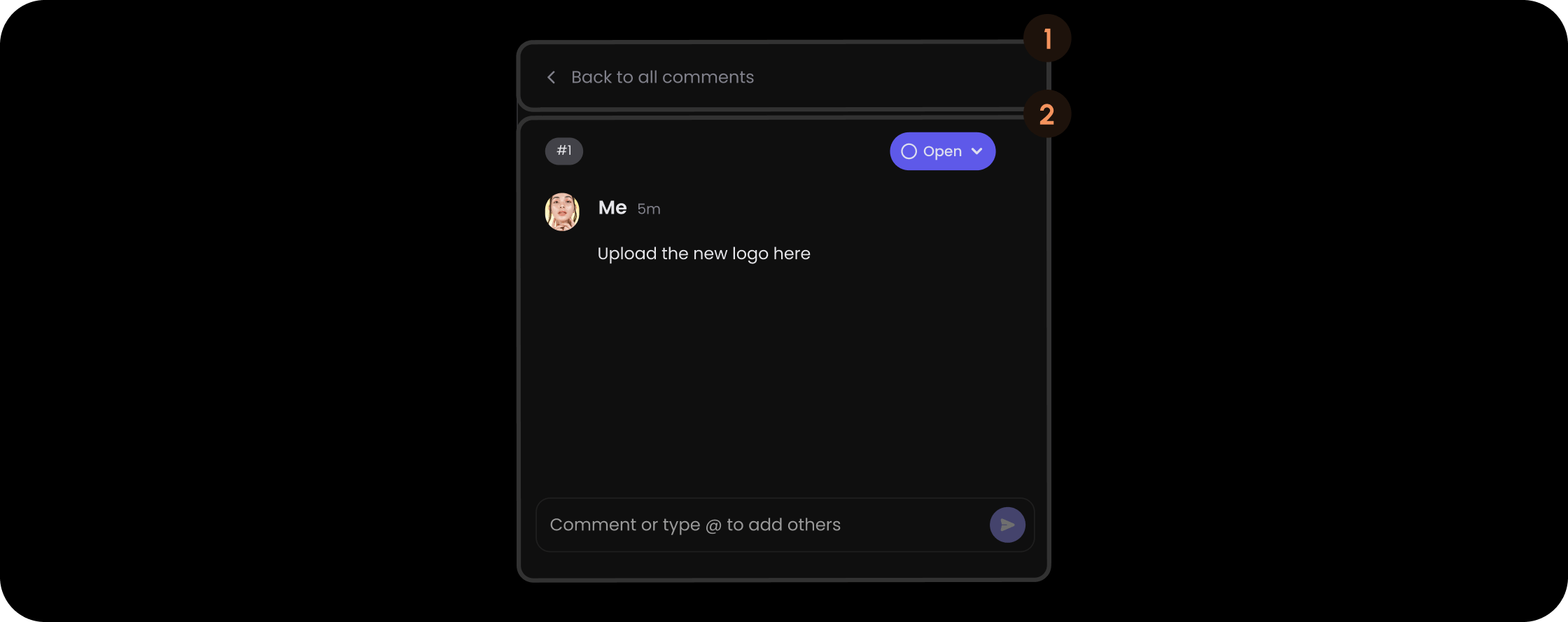
- React / Next.js
- Other Frameworks
BackButton (FocusedThread)
.png?fit=max&auto=format&n=M3HkOFrkFmgstAmP&q=85&s=4353c8fbe7e481bc263356bb99501fef)
- React / Next.js
- Other Frameworks
DialogContainer (FocusedThread)
.png?fit=max&auto=format&n=M3HkOFrkFmgstAmP&q=85&s=013c53126c815a20863774f73931f268)
- React / Next.js
- Other Frameworks
Styling
Disable ShadowDOM
- By default, ShadowDOM is used to ensure that your app’s CSS does not interfere with the styling of the SDK components.
- Disable the shadow dom to apply your custom CSS to the component.
Default: true
- React / Next.js
- Other Frameworks
Example
API methods
Dark Mode
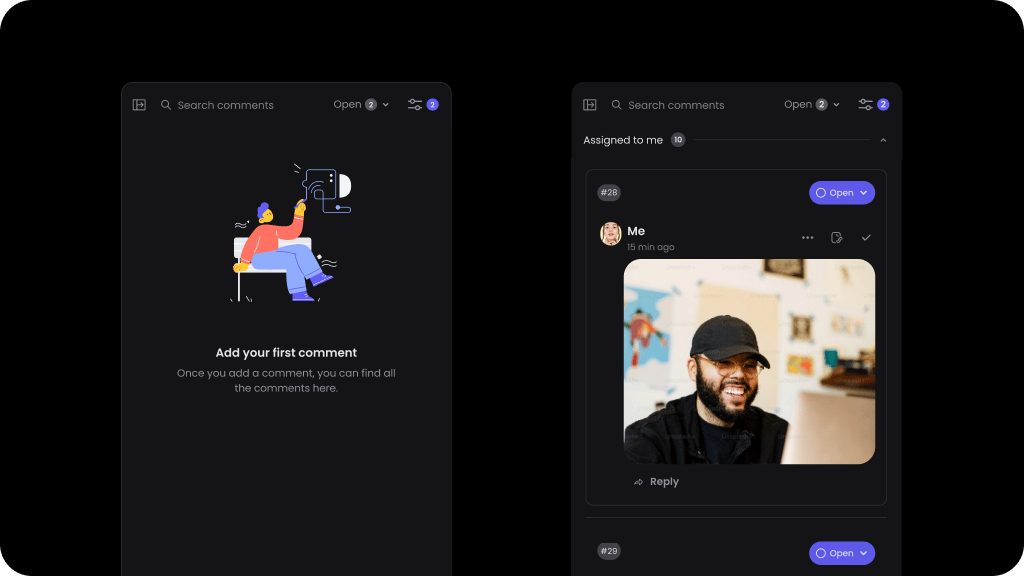
Default: false
To enable Dark Mode for comments sidebar:
- React / Next.js
- Other Frameworks
Example
API methods
Variants
Here are the variants that you can use in Comments Sidebar:variant: This is the variant for the entire Comments Sidebar.dialogVariant: This is the variant for the Comment Dialog that appears in the Comments Sidebar.pageModeComposerVariant: This is the variant for the Comment Composer that appears in the Comments Sidebar in page mode.focusedThreadDialogVariant: This is the variant for the Comment Dialog that appears when a focused thread mode is enabled.
- React / Next.js
- Other Frameworks
React / Next.js